# Swirl Networks — the in-store platform that got acquired by Best Buy
> Hired into marketing, I ended up leading product design — and shipped the in-store media platform Swirl was acquired by Best Buy for.
- Author: Alejandro Haydar
- Published: 2018-12-15
- Taxonomy: Product Design, Design Systems, Strategy & Research, Interaction, Workflows, Case Study
- Canonical: https://alejandroastroport.netlify.app/case-studies/swirl-networks/
---
import { ToolMigration } from '../../components/ui/tool-migration';
I was hired into marketing to make campaign assets. When the lead UX designer left, the entire design system left with him — locked inside a single Photoshop file — and a stalled roadmap piled up behind it. The CPO asked me to take it on. Over the next two years I led product design on the platform that turned Swirl from a beacons company into an in-store **media network**, and that Swirl was eventually **acquired by Best Buy** for.
This is the whole build: the foundation call that unblocked everything, the four features that shipped once it did, and the one line I deliberately wouldn't cross.
The measurement view. Test vs control, dwell time, and drive-to-store uplift — the proof brand partners had been buying in-store media without.
## The bet: one console for two very different operators
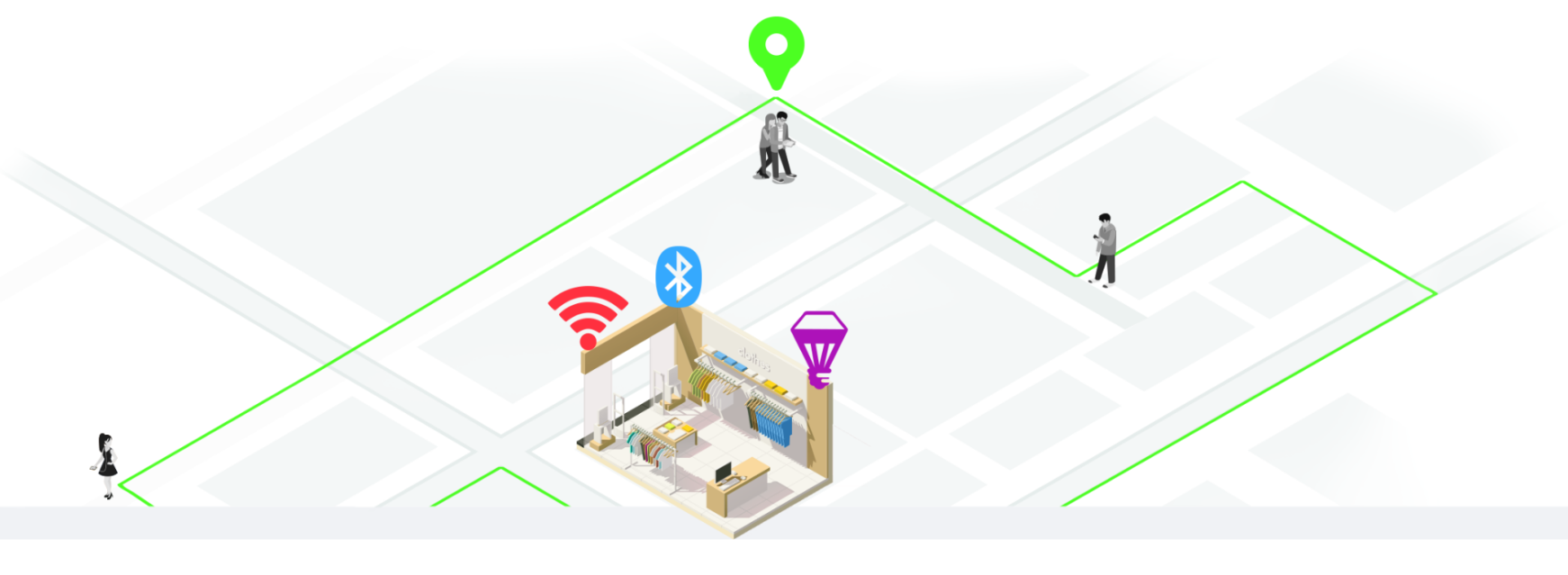
Swirl was an in-store mobile marketing platform for large retailers. Bluetooth beacons and Wi-Fi sensors detected nearby phones; geofences caught shoppers before they walked in and after they left. The platform's job was to turn that mess of radio signals into something a marketer could run a campaign on.
The signal layer. Beacons, Wi-Fi, and geofences — the raw material every screen in this case study had to abstract away.
The Swirl Platform was the workspace, and it served **two** audiences at once: agencies running national campaigns and in-store managers running ads for a single location. Campaign builder, audience targeting, geofence editor, analytics, content management — a lot of surface area for a small team. Four new projects were queued and none could move, because nobody could build on top of a PSD without breaking it.
## Foundation first: killing the master PSD
The fast move was to crack open the PSD and start patching. Then I spent an afternoon watching what hand-off actually looked like — a developer asking "what's the spec for this dropdown?", someone digging through layer groups, someone else screenshotting a region into Slack to eyeball the spacing. Color values weren't documented; they lived inside whichever screen used them first. The bottleneck wasn't the design queue. It was the hand-off.
So I made a different call: don't touch the PSD. Rebuild the system in Sketch — real symbols, shared text styles, tokens, a hand-off pipeline through Abstract — and let it grow alongside the work instead of stopping the world for a rewrite.
The predictable first question was *how long is the rebuild going to take?* — the question that kills these proposals, because "indefinite" is the wrong answer in a quarter with shipping commitments. So I scoped it differently: no big-bang rewrite. Every new project shipped on the new components; screens nobody was touching stayed in PSD purgatory until they got touched. The hardest decisions were about what to *leave out* — bespoke modals, one-off button states, a campaign step on a different grid. If a screen needed something the system didn't have, we added it to the system first, then used it. That rule alone killed half the inconsistency. Every shippable project that year was downstream of this call.
## The line we wouldn't cross
Once the system was real, the stalled work started shipping — and the biggest piece was making every in-store screen presence-aware. Endcap displays, kiosks, aisle signs had all played the same loop regardless of who walked past. We fused mobile, signage, and CRM segments into one platform where a screen could react to its audience in real time.
Indoor location at Swirl scale meant we knew, with real precision, who was where. CRM onboarding meant we could pair a beacon ping with "Platinum Rewards member, lifetime value > $500." We *could* have put a name on a screen. We didn't — and that restraint was the spine of the design. A digital sign is a public surface; other shoppers see it. So every targeting flow was built around aggregate behavior, anonymous segments, and contextual triggers — never the individual. A marketer could light up content for "Platinum Rewards members in Men's, 12–2pm" as a *segment*; they could not pull up "John Smith just walked in." The platform had to feel like the store was paying attention, not like it had been *watching*.
The operator side had a second discipline: raw signals are a mess — BLE UUIDs, Wi-Fi access points, GPS zones, signage IDs — and none of it means anything to a marketing team. The design work *was* the abstraction.
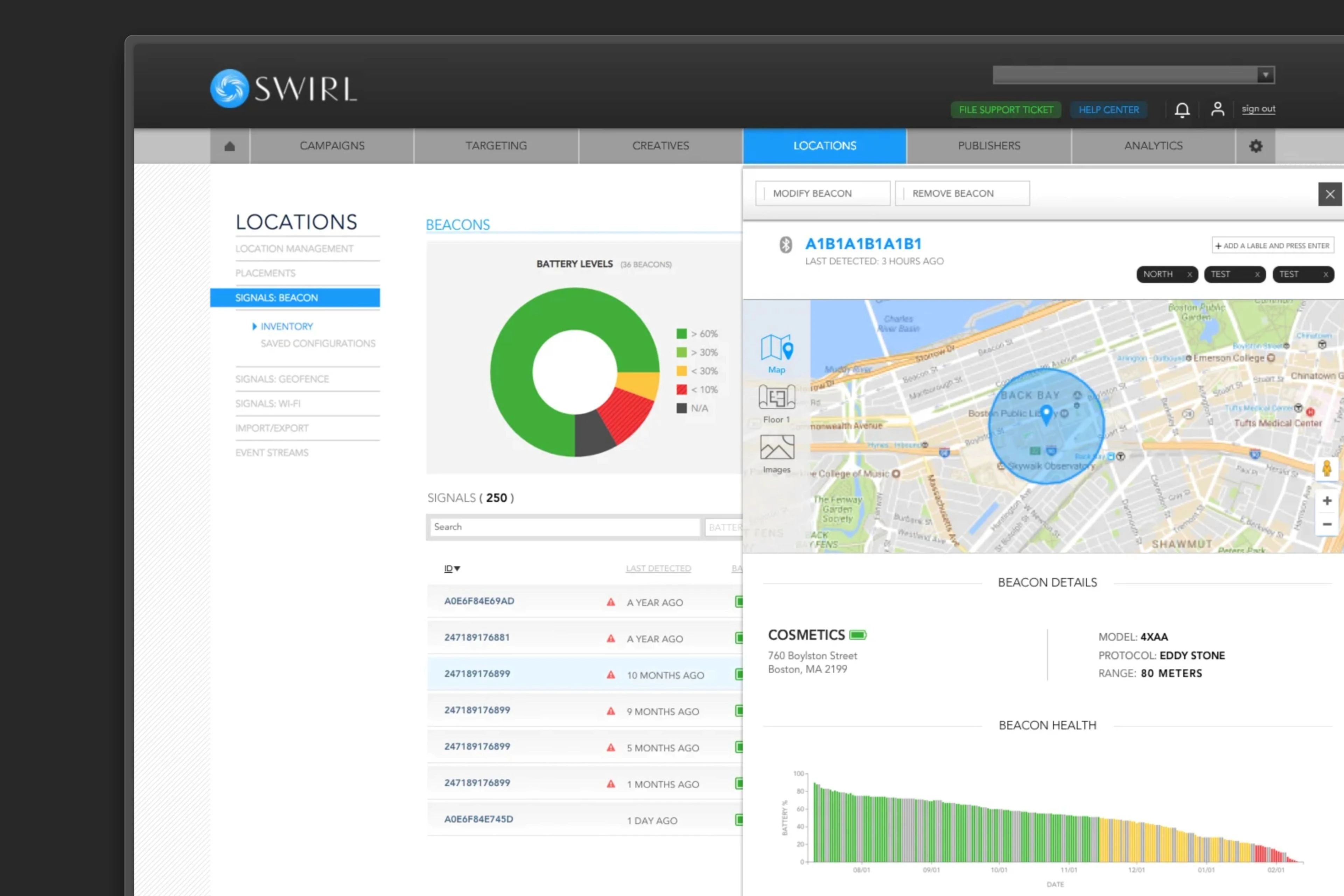
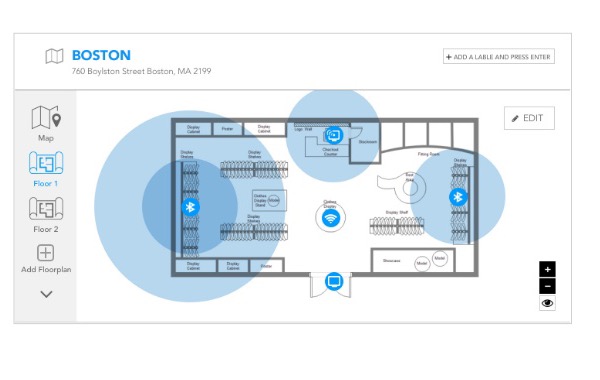
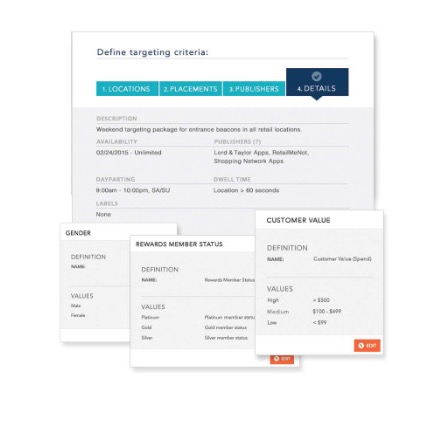
Fleet Management. One floorplan replaces three hardware dashboards. Every signal pinned to the map and tagged with the marketing label a campaign targets against.Targeting Wizard. Raw CRM fields become point-and-click filters. Every segment is anonymous and aggregate — the wizard makes hyper-targeting on PII structurally impossible, by design.
Content Builder let marketers design the phone and the in-store screen in the same view, so the synchronized pairing was a first-class concern, not a hand-off. And Campaign Analytics finally showed **drive-to-store uplift against a control group** — the proof brand partners had been buying in-store media without for years. The signage program shipped with **Best Buy** as launch partner.
## Weather, as a condition marketers could compose themselves
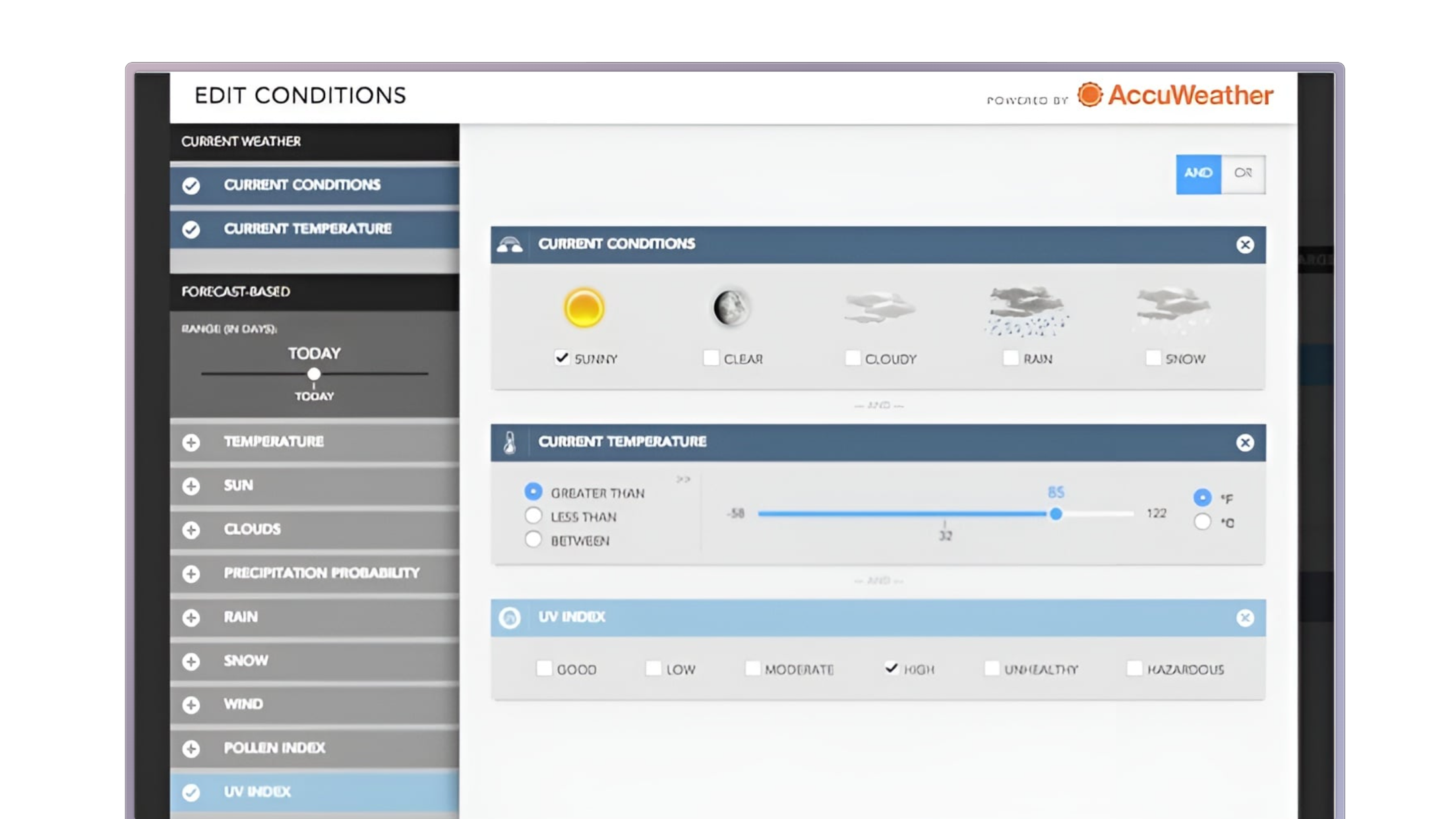
Beacons fired what they fired; geofences caught proximity. The missing axis was the one nobody owns and everyone watches: the weather. AccuWeather had the data, but plugging it into a campaign meant filing a ticket and waiting on an engineer. Most ad platforms shipped a fixed "Sunny / Rainy / Cold" dropdown — which broke the moment a marketer wanted *"above 75° AND sunny OR cloudy."*
I didn't want a dropdown. I wanted a small builder: a ±5-day forecast slider, a single AND/OR toggle, and stackable AccuWeather conditions as cards. A builder *is* a small query language, and the risk was a marketing team bouncing off it — so the mitigations were all visual: sliders instead of date pickers, one big toggle instead of clauses, AccuWeather's own vocabulary instead of engineering's.
Condition Builder. Three knobs, composable in any combination. "Atlanta stores, when pollen count is high" went from a meeting-and-a-developer to about ninety seconds.
One rule could fire through three surfaces already in production — the retailer's app, the AccuWeather app, and Google Nearby. The lesson wasn't about weather; it was that a real composition surface for non-technical users is worth building, as long as it never reads like a developer tool.
## An inspector for the connections marketers owned
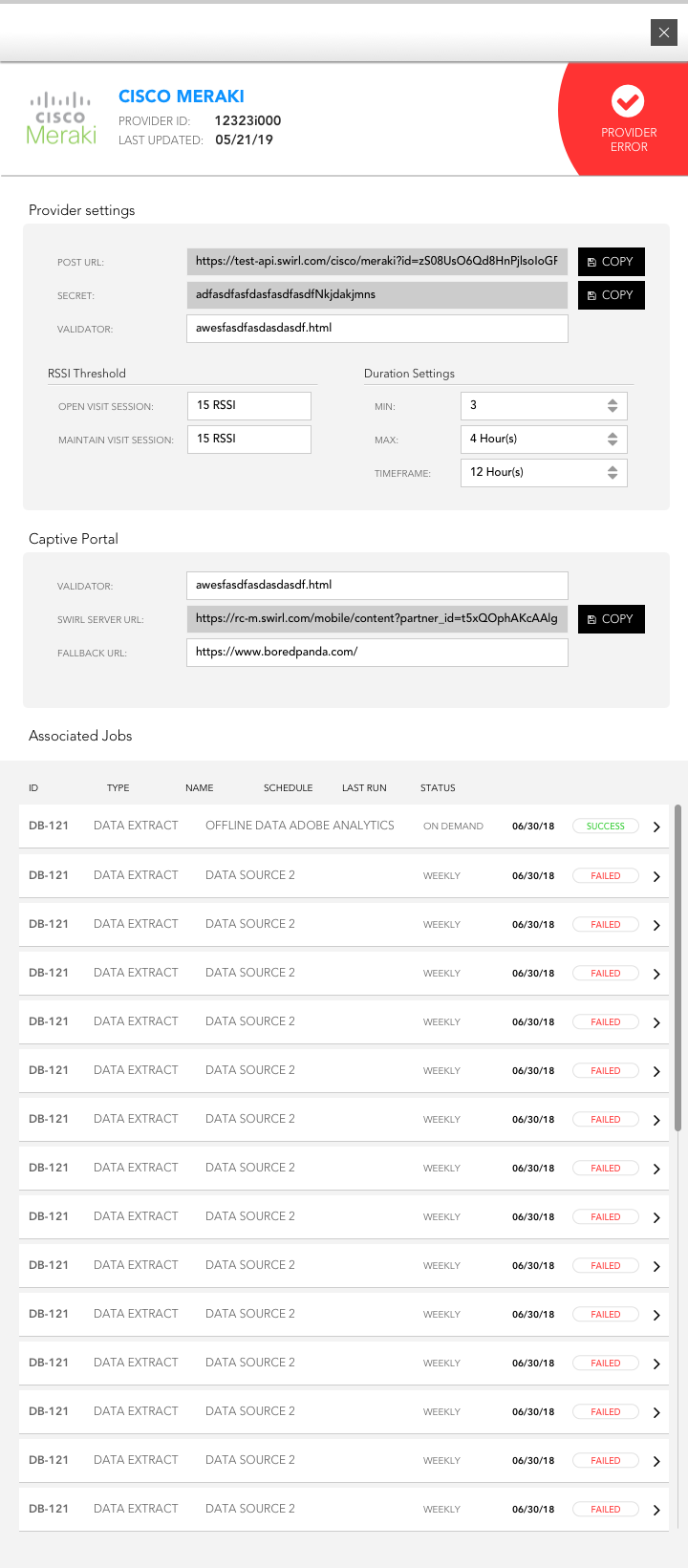
In 2018, Postman was a tool engineers used to inspect APIs. There was no equivalent for the marketer who actually *owned* the connection — and connections were the lifeblood of every campaign. Swirl ran on a stack of live pipelines: beacon vendors, DMPs, email and CRM platforms, analytics, data co-ops. When one broke at 3am, the marketing team found out only when a campaign silently stopped, filed a ticket, and paged engineering — half of which was provider noise that didn't need an engineer to identify, only to acknowledge.
The line was deliberate: **diagnose, don't fix.** No credential entry, no raw API tooling — those are security boundaries that belong with engineering. But a provider list, a config panel, and an Associated Jobs table showing every data-extract run and its status was enough to file a useful ticket and know whether the fault was Swirl's or the vendor's before paging anyone.
Provider error state. The error surfaces immediately, in the marketer's vocabulary — PROVIDER ERROR, not HTTP 401. Framed around the only question they're asking: is this connection working right now?
## Emails treated as a product surface
Most platforms in 2018 treated notification emails as a chore: a subject line, a button, a stale screenshot, ship it. The data was already in the platform — the blocker was that email was considered out of scope for design. I'd spent years coding high-converting emails, so giving up at the edges didn't sit right.
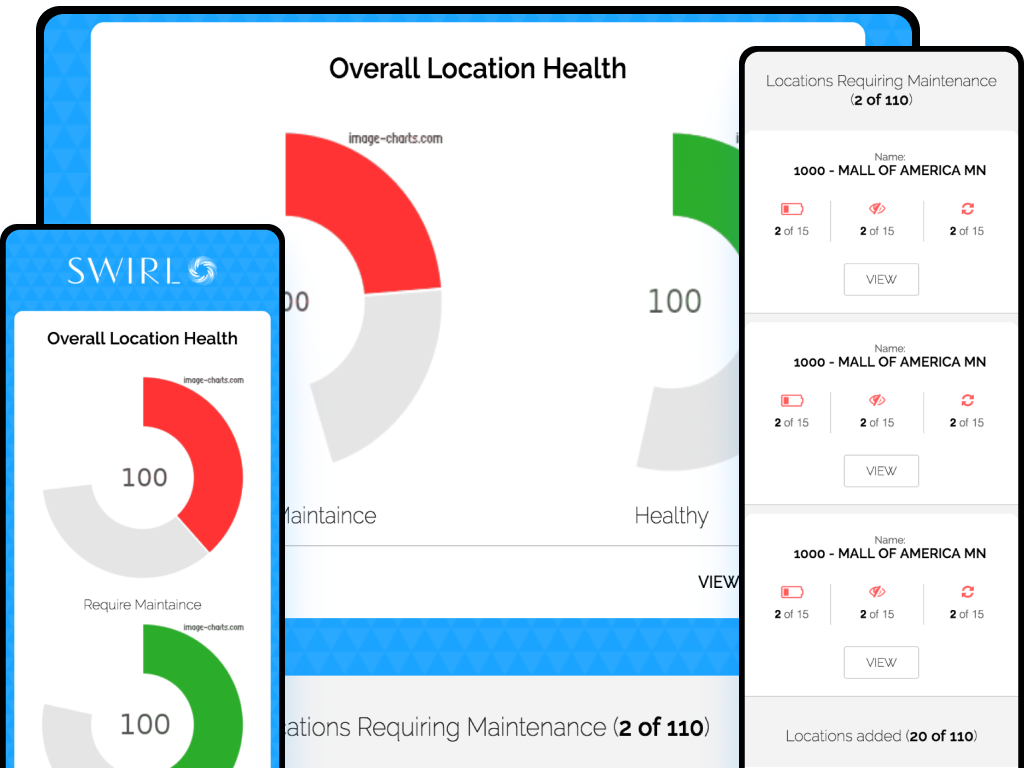
Two bets at once. **MJML** (React-for-emails at the time) let me build email layouts from shared components and a real type scale instead of fighting Outlook through hand-written `
` tags. And **dynamic charts via the Image Charts API**: the platform queried its own data at send time, encoded the results into a chart URL, and dropped it straight into the template — so the recipient saw a chart built from their *actual* numbers, not a two-week-old screenshot. Click it, and you landed on the console view that matched, already scoped to the same range and segment.
Live digests. Fleet health rendered from platform data at send time, with drill-down links back to the matching console view. The design system running all the way to the edges.
## The impact
Four major features that had been stalled for months shipped in two quarters. Agency planners and in-store managers ran synchronized mobile-and-signage campaigns from one console. Brand partners got real measurement on in-store media for the first time. The in-store signage program launched with Best Buy — and **Swirl Networks was eventually acquired by Best Buy.** The platform built during this stretch is what the acquisition was for.
## What I carried forward
Two things. **Stepping up rarely comes with a title** — I was hired to make marketing assets; the lead role was never offered, so doing the work was the title. And **the foundation decides what's possible later** — every shippable project that year was downstream of the call to throw out the PSD and build a real system instead.
The through-line across all four features was restraint at scale: a platform that knows everything about a shopper has to be designed by people who decide, deliberately, what *not* to do with that knowledge. It's where I learned the half of forward deployed work that isn't code. The design *was* the abstraction layer between raw signals and the people running campaigns, and the most important decision was a guardrail: what the system must never do. The hyper-targeting we declined to build is the reason marketers, brand partners, and shoppers all trusted what we shipped.
The kicker: the CPO who hired me at Swirl brought me on again as a contractor at Genscape, and again at Thought Industries. The strongest signal that the work landed was the second and third invitations.