# Making every in-store screen presence-aware
> Designing an in-store ad platform where every digital screen reacts to who's nearby — without crossing into surveillance.
- Author: Alejandro Haydar
- Published: 2018-06-12
- Category: Product Design
- Canonical: https://alejandroastroport.netlify.app/showcases/bestbuy-location-marketing/
---
In 2017, every digital screen in a retail store was dumb. Endcap displays, kiosks, aisle signs — all played the same content on loop, regardless of who walked past. Mobile campaigns, signage campaigns, and CRM segments lived in three different tools. Brand partners bought in-store media blind.
I led product design on a platform that fused all of it: every screen reacting to its audience in real time, with the kind of measurement brand partners had been asking for for years. The harder part of the job was deciding what *not* to build.
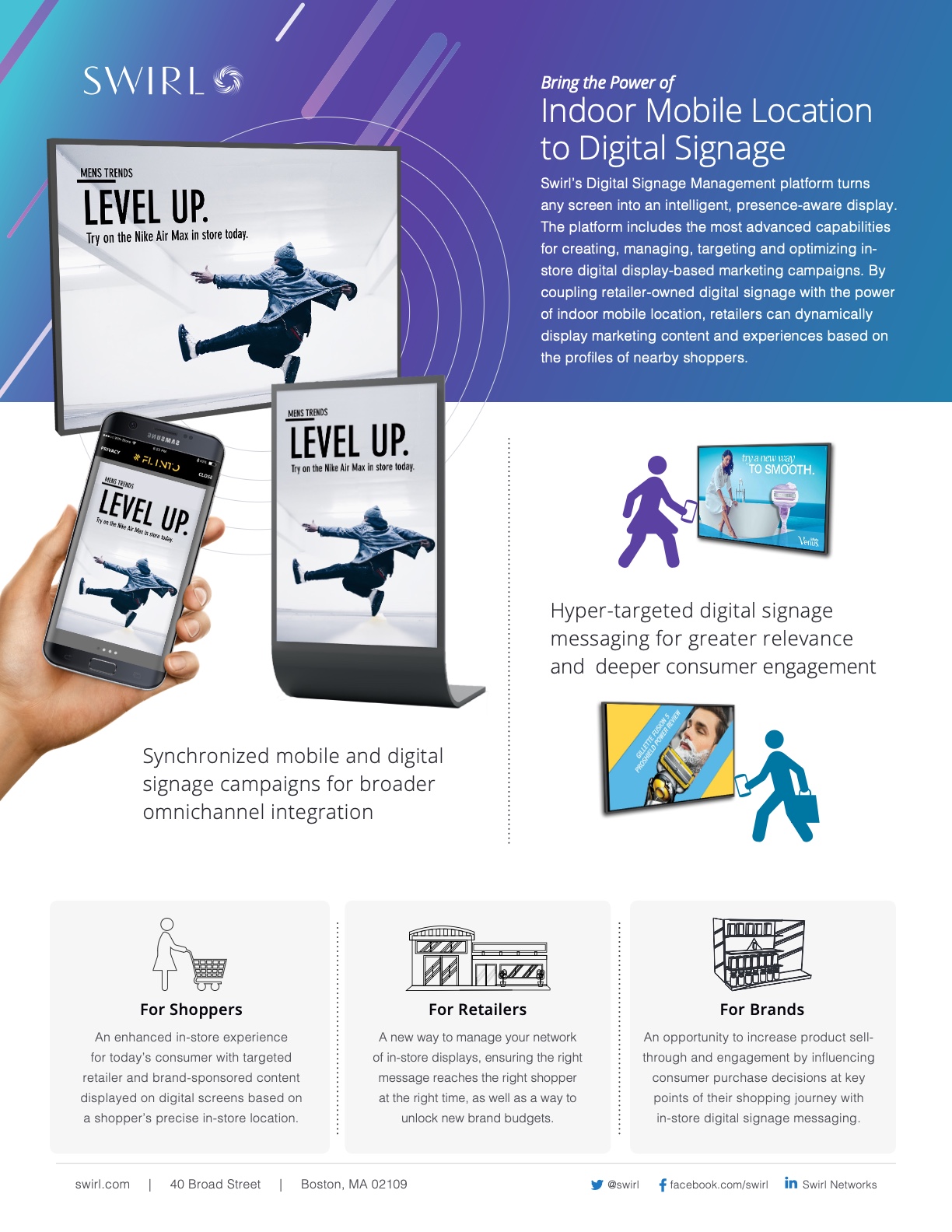
One platform, two surfaces. A shopper's phone and the in-store display playing the same campaign at the same moment — the core experience the platform was built to deliver.
### The setup
Swirl had pioneered indoor mobile location — beacons, BLE, the whole proximity layer. Push-to-phone worked. But retailers wanted more: they wanted their **digital signage** to react to whoever was standing in front of it.
That meant building one platform where mobile and signage shared signals, segments, and measurement — and where a marketer could operate it without an engineer in the loop.
### The line we wouldn't cross
Indoor location at Swirl scale meant we knew, with real precision, who was where. CRM onboarding meant we could pair a beacon ping with "Platinum Rewards member, lifetime value > $500." We could have surfaced PII on a screen. We could have called shoppers out by name. We could have hyper-targeted to the individual.
We didn't. That was the spine of the design.
A digital sign isn't a phone — it's a public surface. Other shoppers see what plays on it. Hyper-targeting one person with PII would have made the moment creepy for them and confusing for everyone nearby. The platform had to feel like the store was paying attention, not like the store had been *watching*.
So I designed every targeting flow around aggregate behavior, anonymous segments, and contextual triggers — never the individual. A marketer could light up content for "Platinum Rewards members in Men's, 12–2pm" as a *segment*. They couldn't pull up "John Smith just walked in." That guardrail wasn't a constraint someone else handed me; it was the thing that decided what shipped and what didn't.
### Translating raw signals into a marketer's language
A second decision shaped the operator side. Indoor location is a mess of physical signals — BLE UUIDs, WiFi access points, GPS zones, signage IDs. None of that means anything to a marketing team.
The platform had to abstract those signals into language marketers already used. "Men's Footwear, near the Nike wall, 10am–2pm" instead of "beacon UUID 7F-23 at -67 dBm." Floorplan-first instead of list-first. Saved segments instead of raw queries.
I shipped four operator surfaces around this idea, plus one partner-facing surface:
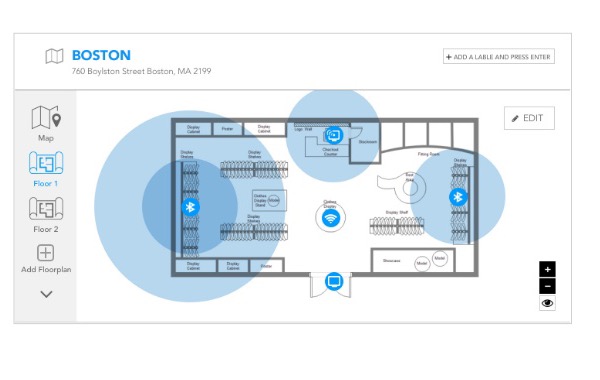
**1. Fleet Management.** Upload a store map, drop signal pins (BLE / WiFi / GPS / signage) onto it, tag each one with a marketing label. One floorplan view replaces what used to be three separate hardware dashboards.
Fleet Management. The Boston pilot store, mapped on a floorplan. BLE coverage, WiFi access points, GPS zones, and signage all live on one canvas, each tagged with the marketing label a campaign will target against.
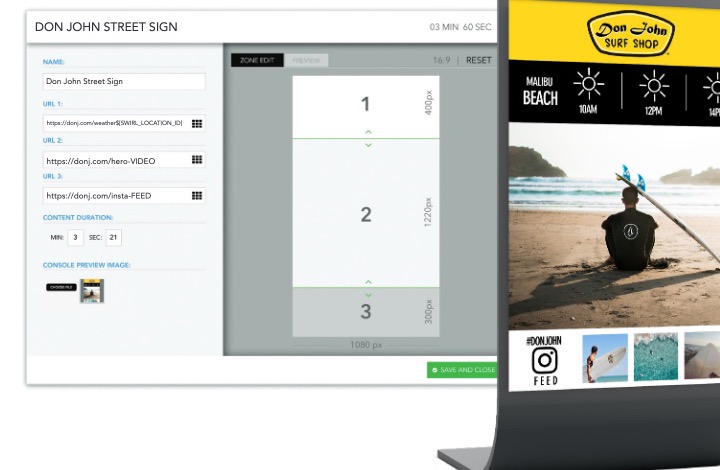
**2. Content Builder.** A multi-zone canvas for designing what plays on each screen. Any URL-based asset works — video, full-screen interstitial, split-screen, live feed. Phone, tablet, and signage previews render side by side, so the mobile-and-signage pairing gets designed *together*, not after the fact.
Content Builder. A zone-edit screen alongside the rendered three-zone preview. Designing the screen and the phone in the same view forced the synchronized experience to be a first-class concern, not a hand-off.
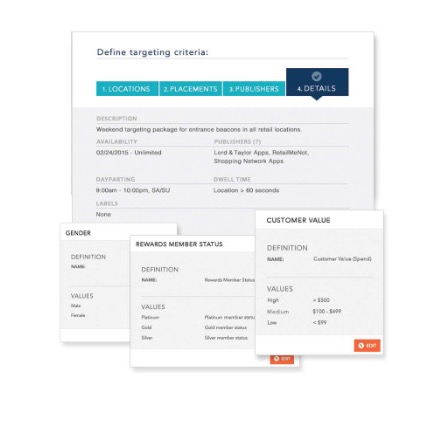
**3. Targeting Wizard.** A four-step flow — Locations → Placements → Publishers → Details. CRM data onboards automatically, so "Platinum Rewards member, value > $500, in Men's between 12–2pm" becomes a saved segment without an engineer in the loop. Reusable targeting packages mean a campaign that worked in Boston can be cloned to 200 stores in a click.
Targeting Wizard. Raw CRM fields became point-and-click audience filters. Every segment is anonymous and aggregate — the wizard makes hyper-targeting on PII structurally impossible, by design.
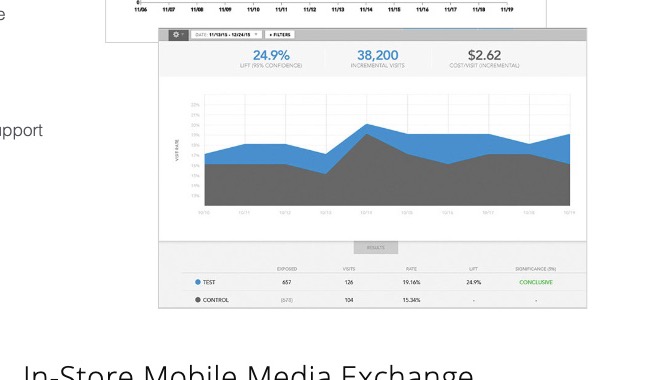
**4. Campaign Management & Analytics.** Point-and-click campaign setup with dayparting, frequency caps, sequencing, and dwell-time triggers. Live dashboards show traffic, visit duration, department dwell, and **drive-to-store uplift against a control group** — the proof brand partners had been buying without.
The measurement view. Test versus control, dwell time, and drive-to-store uplift in one place — the kind of proof brand partners had been buying without.
A fifth surface — the **Mobile Media Exchange (MMx)** — opened the platform to brand partners. Retailers packaged and priced their inventory; brands self-served creative, submitted it for approval, and tracked performance. In-store screens became a measurable media channel for the first time.
### Where it shipped
The platform ran across enterprise retailers in 2017–2018. Marketers ran synchronized mobile and signage campaigns from a single console. Brand partners had the measurement they'd been buying without for years. The "designed for serendipity, not surveillance" thesis held up at scale.
### What I'd take with me
The lesson wasn't about beacons or signage. It was about restraint at scale. A platform that knows everything about a shopper has to be designed by people who decide, deliberately, what *not* to do with that knowledge. The hyper-targeting we declined to build is the reason marketers, brand partners, and the shoppers themselves trusted what we shipped.
The second lesson: when raw signals are messy, the design work *is* the abstraction. Fleet Management on a floorplan, segment language pinned to CRM fields, four-step wizards instead of forty-field forms — that's not polish on top of the product, it's the product.